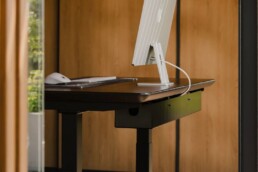

A clean desk doesn’t happen by removing everything, it happens by controlling everything.
Most home office setups look cluttered not because there are too many devices, but because the infrastructure is exposed. Hanging cables under the desk. Power strips sitting on the surface. Monitor stands taking up valuable space. Loose charging wires cutting across the workspace. Small items spreading outward with no defined zone. None of these feel dramatic individually — but together, they create visual noise.
Minimal doesn’t mean empty. It means intentional.
A clean desk setup works because:
- Cables are hidden, not hanging
- Power is integrated, not visible
- The monitor floats instead of sitting on a stand
- Small wires are controlled
- Accessories are grouped instead of scattered
- Lighting adds depth without adding clutter
When these structural problems are solved, the desk immediately feels calmer, more modern, and more focused. The surface opens up. The visual weight decreases. The entire setup looks engineered instead of improvised.
You don’t need custom furniture or a full redesign. What you need are the right product types:
- Under-desk cable tray
• Monitor arm
• Desk power solution (grommet or mounted strip)
• Cable clips for surface control
• Large desk mat to visually anchor the setup
• Vertical storage (laptop stand, headphone hook)
• Clean lighting (like a monitor light bar)
These are not random accessories, they are the structural foundation of a minimal home office.
In this guide, we’ll break down each category clearly and practically, so you can build a clean desk setup that not only looks better but feels more organized, more intentional, and easier to use every day.
Let’s start with the most important layer: cable management.
Under-Desk Cable Tray
(The Foundation of a Clean Desk)
A clean desk always begins underneath.
If cables are hanging below the desk, touching the floor, or looping behind table legs, the setup will never feel truly minimal — no matter how organized the surface looks. Most clutter actually lives out of sight, and that hidden mess creates visual noise from side angles and open spaces.
An under-desk cable tray gives your power strip, adapters, and excess wiring a defined place to live. Instead of dangling freely, everything is lifted, grouped, and secured under the desk. The result is immediate — fewer visible wires, cleaner lines, and a setup that feels intentional instead of improvised.
The biggest benefit isn’t just aesthetics — it’s structure. When cables are contained inside a tray, they stop pulling downward, they stop tangling, and they stop distracting you during daily use. For standing desks, it also prevents cables from stretching awkwardly during height adjustments.
There are two common types of under-desk cable management trays:
- Clamp-on cable tray – attaches to the desk edge without drilling and works well for moderate cable setups.
- Screw-in cable tray – mounts directly into the underside of the desk and offers stronger support for heavier electrical builds.
When choosing one, pay attention to tray depth, steel strength, and desk thickness compatibility. Many setups fail simply because bulky power bricks don’t fit properly, forcing cables to bend or compress unnaturally.
Once your cables and mounted power strip are secured underneath the desk, the surface becomes dramatically easier to simplify. That’s why under-desk cable management is always the first step in creating a clean desk setup.
Monitor Arm
(The Upgrade That Instantly Modernizes Your Desk)
If the under-desk cable tray cleans what’s below, a monitor arm transforms what’s above.
Traditional monitor stands sit directly on the desk, taking up valuable space and creating visual weight in the center of your setup. They also expose cables behind the screen, which often hang loosely or curve awkwardly toward the edge of the desk. Even if everything else is organized, that bulk in the middle breaks the minimal look.
A monitor arm lifts the screen off the surface and allows it to “float.” This single change instantly makes the desk feel lighter, more open, and more modern. The space underneath the monitor becomes usable again — whether for a keyboard, notebook, or simply clean empty space.
Another major advantage is built-in cable routing. Most modern monitor arms include an internal or rear cable channel that hides the power cable and display cable inside the arm itself. Instead of seeing wires drop down behind the screen, you see a clean vertical line.
There are two main configurations. A single monitor arm is ideal for minimalist setups focused on simplicity and symmetry. A dual monitor arm keeps two displays aligned without doubling the footprint of two separate stands. In both cases, the goal is the same: reduce surface clutter and improve visual structure.
When choosing a monitor arm, check for weight compatibility, smooth adjustment, and a strong clamp or grommet mount. A sagging or unstable arm defeats the purpose of a clean setup.
Once your monitor is elevated and cables are routed properly, the desk surface opens up. Combined with proper under-desk cable management, this is where a setup starts to feel intentional instead of improvised.
Desk Power Solution
(Removing Visible Power Strips from Your Surface)
One of the fastest ways to ruin a clean desk setup is a visible power strip sitting on top of the surface.
Bulky adapters, thick plugs, and tangled charging cables create visual clutter even if everything else is organized. A minimal desk should look powered — not wired.
A proper desk power solution removes that problem entirely. Instead of placing a surge protector on the surface, power is either mounted underneath the desk or integrated directly into it. The result is a cleaner top view and a more structured layout.
There are two common approaches.
An under-desk mounted power strip keeps all plugs hidden inside your cable tray. Cables travel upward neatly, and the adapters stay out of sight. This is the simplest and most common solution for home office setups.
A desk grommet power outlet creates a built-in look. Installed through a desk cutout, it allows you to plug in devices directly from the surface without exposing a full power strip. This option feels more engineered and is common in modern office environments.
The goal is simple: eliminate visible power bricks and prevent cables from spreading randomly across the desk.
When your power strip, charging adapters, and USB hubs are integrated properly, the desk surface becomes easier to control. Combined with a monitor arm and under-desk cable tray, your workspace starts to feel structured instead of improvised.
Clean setups don’t remove technology — they organize it intelligently.
Cable Clips & Surface Cable Control
(Managing the Small Details That Break the Look)
After hiding cables underneath and removing visible power strips, the final visual distractions usually come from small wires on the surface.
A single loose charging cable, mouse cable, or USB wire stretched across the desk can undo all the structural work you’ve done. Clean setups fail not because of major mistakes — but because of minor unmanaged details.
This is where cable clips and surface cable organizers become essential.
Small magnetic cable clips or adhesive cable holders keep frequently used wires anchored to the desk edge. Instead of sliding off the surface or forming messy loops, cables stay in a fixed position. The difference may seem subtle, but visually it makes the desk feel controlled.
The key is not to hide every cable — it’s to make them look intentional. Shorter cables, properly routed along edges, create clean lines instead of random curves.
Surface cable control works best when combined with your under-desk cable tray and desk power solution. Power stays hidden, and only the necessary connection points remain visible — neatly aligned.
When small cables are managed correctly, the entire desk feels calmer. It’s a detail-level upgrade, but it plays a major role in maintaining a clean desk aesthetic over time.
Large Desk Mat
(The Visual Anchor That Ties Everything Together)
Once cables are hidden and hardware is elevated, the next upgrade isn’t technical — it’s visual.
A large desk mat acts as the foundation of the surface itself. Without it, your keyboard, mouse, and accessories can look scattered across an empty tabletop. With it, everything feels grouped and intentional.
A desk mat creates a defined workspace zone. It visually anchors your keyboard, mouse, and even a small notebook into one cohesive area. Instead of floating independently, items now belong to a structured layout.
This simple layer adds more than just aesthetics. A quality desk pad reduces glare, protects the surface, softens sound, and adds texture to an otherwise flat desk. Whether it’s leather, felt, or minimalist PU material, the tone of the mat often sets the tone for the entire setup.
The key is size. A small mat looks like an accessory. A large desk mat looks like part of the desk.
When combined with a monitor arm, clean cable management, and controlled surface wiring, the desk mat helps complete the visual story. It doesn’t hide clutter — it prevents the surface from feeling fragmented.
A clean desk aesthetic isn’t just about removing cables. It’s about creating balance. And the desk mat plays a major role in that balance.
Vertical Laptop Stand
(Creating Space by Lifting Devices Off the Surface)
After cables are hidden and the surface is anchored with a large desk mat, the next step is reducing horizontal clutter.
Many desks feel crowded not because there are too many items — but because devices spread outward. A laptop lying flat beside a monitor instantly consumes usable space and makes the desk feel tighter than it is.
A vertical laptop stand changes that completely.
By docking your laptop upright, you reduce its footprint to a narrow vertical line. The desk surface immediately opens up, and the setup feels more structured. Instead of the laptop competing with your keyboard and mouse for space, it becomes part of the background architecture.
This is especially effective when paired with a monitor arm. With the external display elevated and the laptop docked vertically, the desk looks intentional rather than overloaded with devices.
Beyond aesthetics, a vertical stand also improves airflow and organization. Cables route more cleanly toward the back of the desk, especially when combined with proper under-desk cable management.
The goal isn’t to remove your laptop — it’s to position it intelligently.
When devices are lifted or docked vertically instead of spread across the surface, negative space increases. And negative space is what makes a desk feel minimal.
Monitor Light Bar
(Clean Lighting Without Adding Clutter)
Lighting is often the finishing touch that separates an average desk from a refined one.
Traditional desk lamps take up space. They add another base, another cable, and another object competing for attention. Even a well-designed lamp can disrupt the clean lines of a minimal setup.
A monitor light bar solves that problem by mounting directly on top of the screen. It provides focused task lighting without occupying any surface space. There’s no base, no extra footprint — just clean illumination exactly where it’s needed.
Because it sits above the monitor, the desk surface remains uninterrupted. Combined with a monitor arm, the entire upper portion of the setup feels light and structured instead of crowded.
Clean lighting does more than improve visibility. It adds depth. A properly lit desk feels calmer and more intentional. Subtle under-desk LED backlighting can further enhance this effect, creating separation between the desk and the wall without introducing visual noise.
The key is restraint. Lighting should enhance the setup, not dominate it.
When paired with proper under-desk cable management, a floating monitor, controlled surface cables, and a large desk mat, a monitor light bar completes the clean desk aesthetic without adding clutter.
Final Thoughts: Building a Clean Desk Setup That Stays Clean
A clean desk aesthetic isn’t created by removing technology. It’s created by organizing it intelligently.
Most clutter comes from three things: visible cables, bulky hardware sitting on the surface, and devices spreading outward without structure. When those problems are solved, the transformation is immediate.
The formula is simple:
- Hide cables with an under-desk cable tray
- Lift the screen using a monitor arm
- Remove visible power with a proper desk power solution
- Control small wires using cable clips
- Anchor the surface with a large desk mat
- Reduce horizontal clutter with a vertical laptop stand
- Add clean lighting using a monitor light bar
Each piece plays a role. None of them are random accessories. Together, they create structure.
A minimal home office doesn’t feel empty — it feels intentional. The desk surface has breathing room. Cables are controlled. Power is integrated. Devices are positioned, not scattered.
And once your setup is built correctly, it stays clean with far less effort.
That’s the real goal.
Conclusion
A minimal home office doesn’t require expensive furniture or extreme decluttering — it requires intentional structure. A clean desk setup works because everything has a defined place and nothing feels accidental. When cables are hidden inside an under-desk cable tray, when the monitor is lifted with a proper monitor arm, when power is integrated instead of exposed, and when small surface wires are controlled, the entire workspace changes.
The desk feels lighter, calmer, and more focused. It no longer looks assembled — it looks designed.
Clean setups aren’t about removing technology; they’re about organizing it intelligently. Once the foundation is in place, maintaining it becomes simple. Keep cables short, return items to their zones, and avoid adding unnecessary clutter. When every element follows the same structure, your workspace stays minimal without constant effort.
In the end, a clean desk aesthetic isn’t just visual. It reduces distraction, improves clarity, and creates a workspace that feels intentional every single day.